Showing posts with label library. Show all posts
Showing posts with label library. Show all posts
Thursday, June 11, 2009
Rutgers Drops “Library” from Name of School
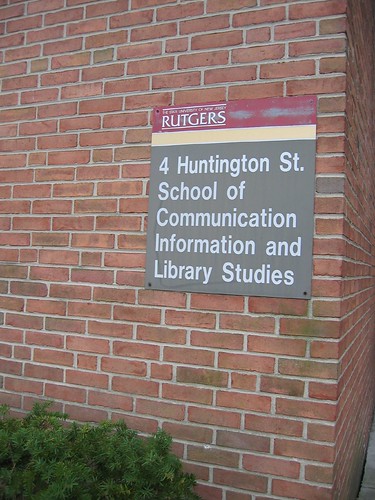 The Rutgers University Board of Governors approved a resolution April 2 removing the words “library studies” from the name of the School of Communication, Information, and Library Studies. Effective July 1, its name will be the School of Communication and Information. The school’s faculty had voted 30–10 in favor of the name change at a February 4 faculty meeting. - posted on ALA site
As a graduate of the MLIS (Master of Library and Information Science) program at the Rutgers School of Communication, Information and Library Studies(SCILS) i am disappointed by this change. The article states that one of the reasons was that people thought that it was solely a library school- that is not a problem of the library studies program but a product of the school not being to define why Library Studies is just as important as the Communications and Information part of the program and that Library studies requires specific skills sets that the marketplace needs.
Image|Flickr|ksscils598s08
Monday, February 09, 2009
Check With Your Local Library First With This Updated Bookmarklet
Thanks to a connection i made at the She's Geeky Conference last month Judith Bush sent me a message on twitter this afternoon about the new xISBN bookmarklet that OCLC has updated and that now supports thousands of libraries. According to the announcement it will be updated on a monthly basis so if a library maintains up-to-date information in the Registry, its data will be automatically reflected in xISBN bookmarklet that has been installed by the user.
Is was only 12 months ago that i found this handy tool, and i can say that i have already probably saved hundreds of dollars by getting books from my local library that typically i would buy from the likes of Amazon. If i could find a combination of this and buying chapters and 'sections' of books that i would like to keep digitally for my digital devices like my laptop, itouch and 'dreaming of getting a kindle' - i would be in heaven!
So what does this Bookmarklet tool do? Here is an excerpt from my post on February17th 2008 on the subject:
So let's imagine that i am on Amazon.com and i am looking at David Weinberger's book 'Everything is Miscellaneous'. I don't have a Kindle so no easy download for me- and perhaps i am not sure i want to commit to having a copy in my book collection before i read it (well this book i actually do-and well marked it is!).
So before purchasing of Amazon.com, I decide to see if my local library system- in my case the Peninsula Library System (PLS)- has the book available. Clicking on the Peninsula Library Bookmarklet i installed- extracts the ISBN from the URL on the bookseller's page (Amazon in this example) and then goes to a library catalog and searches by ISBN.:
 A search against the PLS Catalog shows me libraries in my Library System that i can borrow from that have the book in their collections. I can then cruise down to that location to pick it up, place a hold on the book if it is checked out, or put a request for interlibrary loan right from my browser. There are also many ebooks available from my PLS library system so i can get immediate access to those.

![Reblog this post [with Zemanta]](http://img.zemanta.com/reblog_e.png?x-id=bfbd711e-3945-4d8a-a2be-8f628934947b)
Is was only 12 months ago that i found this handy tool, and i can say that i have already probably saved hundreds of dollars by getting books from my local library that typically i would buy from the likes of Amazon. If i could find a combination of this and buying chapters and 'sections' of books that i would like to keep digitally for my digital devices like my laptop, itouch and 'dreaming of getting a kindle' - i would be in heaven!
So what does this Bookmarklet tool do? Here is an excerpt from my post on February17th 2008 on the subject:
So let's imagine that i am on Amazon.com and i am looking at David Weinberger's book 'Everything is Miscellaneous'. I don't have a Kindle so no easy download for me- and perhaps i am not sure i want to commit to having a copy in my book collection before i read it (well this book i actually do-and well marked it is!).
So before purchasing of Amazon.com, I decide to see if my local library system- in my case the Peninsula Library System (PLS)- has the book available. Clicking on the Peninsula Library Bookmarklet i installed- extracts the ISBN from the URL on the bookseller's page (Amazon in this example) and then goes to a library catalog and searches by ISBN.:
 A search against the PLS Catalog shows me libraries in my Library System that i can borrow from that have the book in their collections. I can then cruise down to that location to pick it up, place a hold on the book if it is checked out, or put a request for interlibrary loan right from my browser. There are also many ebooks available from my PLS library system so i can get immediate access to those.
Monday, April 07, 2008
A Podcast listen on Libraries and the Semantic Web
Back in February i stumbled across a blog that i thought had a good purpose and blogged about the Practical Advice being offered on that Blog focused on Library staff on How to Learn About the Semantic Web. The blog is titled Semantic Library Blog and it is authored by Fiona Bradley an Australian Librarian working for IFLA in the Netherlands.
It seems like i wasn't the only one that found it. Yesterday on my walk to the beach i tuned in to what Fiona had to say during her interview with Richard Wallis at Talis. I enjoyed their conversation and thought the point Fiona made that the cataloging community will be the first in the Library to have to deal with Semantic Web is probably on the ball.
She also posted an expanded post on why she got interested in Semantic Web as a follow-up to the podcast in which she writes:
Beyond these issues, I’m interested in what’s next. I think libraries are a natural fit for the Semantic Web because of its emphasis on RDF, and data and metadata. In some ways it’s a return to what we do best - organising information, provenance, databases.
I am a big fan of what Talis has been doing in the Semantic Web community including their talking with Talis Podcasts and their Nodalities blog with Danny Ayers' This Weeks Semantic Web Posts and always enjoy their often focus on the Library world. (and ok i am very big fan of Danny Ayers (Talis Community manager and his DataPortability and Me Video submission to our project!).
Bonus: From This Weeks Semantic Web Lesson, Teaching a Six Year Old About Triples (not to be confused with Triplets- and why every parent should buy their kids a whiteboard)
It seems like i wasn't the only one that found it. Yesterday on my walk to the beach i tuned in to what Fiona had to say during her interview with Richard Wallis at Talis. I enjoyed their conversation and thought the point Fiona made that the cataloging community will be the first in the Library to have to deal with Semantic Web is probably on the ball.
She also posted an expanded post on why she got interested in Semantic Web as a follow-up to
the podcast in which she writes:Beyond these issues, I’m interested in what’s next. I think libraries are a natural fit for the Semantic Web because of its emphasis on RDF, and data and metadata. In some ways it’s a return to what we do best - organising information, provenance, databases.
I am a big fan of what Talis has been doing in the Semantic Web community including their talking with Talis Podcasts and their Nodalities blog with Danny Ayers' This Weeks Semantic Web Posts and always enjoy their often focus on the Library world. (and ok i am very big fan of Danny Ayers (Talis Community manager and his DataPortability and Me Video submission to our project!).
Bonus: From This Weeks Semantic Web Lesson, Teaching a Six Year Old About Triples (not to be confused with Triplets- and why every parent should buy their kids a whiteboard)
Thursday, February 28, 2008
Practical Advice on How to Learn About the Semantic Web
302 Semantic Web Videos and Podcasts for review, another $15 million in funding for Twine (and at least three Twines on the subject already for Beta users!), a new ZDNET blog covering The Semantic Web, a weekly post by Danny Ayers with links related to Semantic technologies that could take a week to review, my Semantic Web folder in my RSS reader is bursting and there is just so much more out there around Semantic Web that sometimes i don't know which way to turn- and i don't think i am the only one.
But even so according to google trends the topic is still not at the level it was in 2004 (i also wonder if that is because specific semantic technologies are now being discussed separately from the 'semantic web' phrase?).

So how can anyone that is not working directly on Semantic Web Technologies but needs to keep up manage to do it? That is one of the items that the Semantic Library blog is trying to address for Information Professionals by exploring the meaning of the Semantic Web and how it might be used and developed in libraries
In a recent post on When and How to Learn about the Semantic Web, Fiona Bradley writes:
"it is difficult to find time to learn new things, particularly if you have no way to apply them in your current role. I learn best when I have a project I can apply my learning to, so for example, I started to use wikis in my work with library associations long before I used them in my job."
Great advice and her Blog the Semantic Library blog is going to be a great resource for information professionals trying to do just that.
But even so according to google trends the topic is still not at the level it was in 2004 (i also wonder if that is because specific semantic technologies are now being discussed separately from the 'semantic web' phrase?).
So how can anyone that is not working directly on Semantic Web Technologies but needs to keep up manage to do it? That is one of the items that the Semantic Library blog is trying to address for Information Professionals by exploring the meaning of the Semantic Web and how it might be used and developed in libraries
In a recent post on When and How to Learn about the Semantic Web, Fiona Bradley writes:
"it is difficult to find time to learn new things, particularly if you have no way to apply them in your current role. I learn best when I have a project I can apply my learning to, so for example, I started to use wikis in my work with library associations long before I used them in my job."
Great advice and her Blog the Semantic Library blog is going to be a great resource for information professionals trying to do just that.
Saturday, February 23, 2008
Can Social Bookmarking Improve Search?
Josh Catone has a post on ReadWriteWeb titled Will Social Bookmarking Pay Dividends with Search Result Augmentation? that points to research out of Standford University that seeks to provide some answers on whether social bookmarking can augment traditional search results on the Web.
The report titled "Can Social Bookmarking Improve Web Search?" includes eleven experiments using del.icio.us designed to evaluate "different aspects of social bookmarking and their impact on web search". The main end results lead to the issue of needing critical mass which is still not here- the paper's authors estimate that only about on tenth of the web has been bookmarked and tagged in del.icio.us and therefore (at least when using only this domain) tagging is not yet ready to make a significant impact on search results.
However the report makes some interesting points that i highlight below that they believe can still be used to improve how search engines work.
The last item that i thought was very interesting (and of course if you have been reading my blog for a while you will know why!) is this one conclusion around Domain tagging in which their recommendation is to 'pay' librarians to tag entire domains.
We also asked our users in our user study whether tags applied only to the URL involved or whether they applied to the entire domain. Our users said that about one in five tags applied not just to the URL in question, but to the domain as a whole. Both of these statements, both in terms of prediction and in terms of our user study suggest that a well financed search engine could pay "librarians" to tag entire domains rather than single URLs. Our broad conclusion was that paying such librarians would be more efficient, and might obviate the need for about 20% of the tags on URLs bookmarked.
The report titled "Can Social Bookmarking Improve Web Search?" includes eleven experiments using del.icio.us designed to evaluate "different aspects of social bookmarking and their impact on web search". The main end results lead to the issue of needing critical mass which is still not here- the paper's authors estimate that only about on tenth of the web has been bookmarked and tagged in del.icio.us and therefore (at least when using only this domain) tagging is not yet ready to make a significant impact on search results.
However the report makes some interesting points that i highlight below that they believe can still be used to improve how search engines work.
- about 25% of URLs entered into del.icio.us are not seen in search engines for 4 weeks to 6 months after publishing. So one of the conclusions is that social bookmarking could be used "as a (small) data source for new web pages and to help crawl ordering.". I think that especially for niche vertical search engines this would make a huge impact- and could help them win traffic over the general search engines
- Users of social bookmarking sites are probably acting largely out of self interest rather than in concert. This means that their actions are largely uncoordinated. del.icio.us has relatively little redundancy in page information for perhaps 50% of URLs and high redundancy for perhaps 20%. Once again i think that bigger benefits could probably be seen in the vertical search space and SPECIFICALLY in the Enterprise space- where users tend to be more community and task focused.
- Tags might be able to help a search engine if tags can be matched to a user's query. This is applying traditional taxonomy search engine optimization models which have proven to provide great value. The report states that the tags that users are applying are on the whole accurate- of course the definition of 'accurate' is wholly dependent on the users and what and why the tag was applied to. For example, a tag of 'produce' could mean a banana or a command for the user- so when a user searches for bananas a work order to produce an art commission might come up so further disambiguation is the key.
- del.cio.us is already experimenting with including bookmarked results results as art of the Yahoo! search interface so it will be interesting to hear more about this from them
The last item that i thought was very interesting (and of course if you have been reading my blog for a while you will know why!) is this one conclusion around Domain tagging in which their recommendation is to 'pay' librarians to tag entire domains.
We also asked our users in our user study whether tags applied only to the URL involved or whether they applied to the entire domain. Our users said that about one in five tags applied not just to the URL in question, but to the domain as a whole. Both of these statements, both in terms of prediction and in terms of our user study suggest that a well financed search engine could pay "librarians" to tag entire domains rather than single URLs. Our broad conclusion was that paying such librarians would be more efficient, and might obviate the need for about 20% of the tags on URLs bookmarked.
Sunday, February 17, 2008
Check with your local Library first with the LibraryLookup Bookmarklet
The LibraryLookup Project is not new (began in Dec 2002!) but i had not heard of it before so when Phil Wolff from Skype Journal mentioned it to me the other day after the DataPortability Meetup, i put it on my to do list- and today i have done it.
This afternoon, i called one of my local libraries that is open on Sunday (not that many are open on Sundays anymore!) to find out that the Peninsula Library uses a Catalog by Innovative. So having that information i gave the LibraryLookup Generator a try- but was unsuccessful (test page worked but bookmarklet did not so perhaps not compatible with current version of Firefox?). So a quick search brought me to WorldCat's xISBN bookmarklets that already had my local library system configured, so with one quick drag to my toolbar and bingo- i was good to go.
So what does the LibraryLookup tool do?
So let's imagine that i am on Amazon.com and i am looking at David Weinberger's book 'Everything is Miscellaneous'. I don't have a Kindle so no easy download for me- and perhaps i am not sure i want to commit to having a copy in my book collection before i read it (well this book i actually do-and well marked it is!).
So before purchasing of Amazon.com, I decide to see if my local library system- in my case the Peninsula Library System (PLS)- has the book available. Clicking on the Peninsula Library Bookmarklet i installed- extracts the ISBN from the URL on the bookseller's page (Amazon in this example) and then goes to a library catalog and searches by ISBN.:
A search against the PLS Catalog shows me libraries in my Library System that i can borrow from that have the book in their collections. I can then cruise down to that location to pick it up, place a hold on the book if it is checked out, or put a request for interlibrary loan right from my browser. There are also many ebooks available from my PLS library system so i can get immediate access to those.
Great stuff- i can't believe i did not know about it all these years! Thanks for the tip- Phil!
Do you live in the Pennisula and don't have a library card (shame on you!)- get it here or find your own public library nationwide.
This afternoon, i called one of my local libraries that is open on Sunday (not that many are open on Sundays anymore!) to find out that the Peninsula Library uses a Catalog by Innovative. So having that information i gave the LibraryLookup Generator a try- but was unsuccessful (test page worked but bookmarklet did not so perhaps not compatible with current version of Firefox?). So a quick search brought me to WorldCat's xISBN bookmarklets that already had my local library system configured, so with one quick drag to my toolbar and bingo- i was good to go.
So what does the LibraryLookup tool do?
So let's imagine that i am on Amazon.com and i am looking at David Weinberger's book 'Everything is Miscellaneous'. I don't have a Kindle so no easy download for me- and perhaps i am not sure i want to commit to having a copy in my book collection before i read it (well this book i actually do-and well marked it is!).
So before purchasing of Amazon.com, I decide to see if my local library system- in my case the Peninsula Library System (PLS)- has the book available. Clicking on the Peninsula Library Bookmarklet i installed- extracts the ISBN from the URL on the bookseller's page (Amazon in this example) and then goes to a library catalog and searches by ISBN.:
A search against the PLS Catalog shows me libraries in my Library System that i can borrow from that have the book in their collections. I can then cruise down to that location to pick it up, place a hold on the book if it is checked out, or put a request for interlibrary loan right from my browser. There are also many ebooks available from my PLS library system so i can get immediate access to those.Great stuff- i can't believe i did not know about it all these years! Thanks for the tip- Phil!
Do you live in the Pennisula and don't have a library card (shame on you!)- get it here or find your own public library nationwide.
Thursday, January 17, 2008
Oh Glorious Library of Congress and Flickr
How the hell am i going to get through all 3,115 and growing photos ?
Via the Library of Congress Blog and Dave Winer's twitter message (how stoked is he because of FlickrFan) - What an AWESOME use of a Flickr Pro account for the Library of Congress...so glad my taxpayer money is supporting that hefty fee of $24.95 per year ;-) (OK it is a partnership so maybe they aren't paying for a Pro account).
Aside from the fact that we all now have access to great quality images f rom the archives that many of us would probably never see, the Library of Congress is not only doing this for our own viewing pleasure and to make Dave Winer's photo display application even cooler when we are procrastinating on Flickr - there is a purpose and very important one.
From their blog post:
If all goes according to plan, the project will help address at least two major challenges: how to ensure better and better access to our collections, and how to ensure that we have the best possible information about those collections for the benefit of researchers and posterity. In many senses, we are looking to enhance our metadata.
Imagine telling these young women "Backstage" at the "girlie" show at the Rutland Vermont state fair in 1941 that in 2008, some random person in San Francisco, looking at the photo in the 'cloud' would tag it with the word tuxedo?
Yes. Using user tagging the Library of Congress wants to enhance their metadata. The October/November 2007- Bulletin of the American Society for Information Science and Technology- Special Section on Folksonomies (multiple articles) had a couple of articles on images tagging by end users that addresses tagging images.
Important facts from their FAQs:
Q: How were the items selected/why did you pick these pictures?
A: We picked two sets of popular images, for which no restrictions on publication or distribution are known, and for which high quality files are available. Because we are also interested in tags and comments on the photos, we picked one set (George Grantham Bain Collection) for which we have minimal identifying information, and another (Farm Security Administration/Office of War Information color photographs) that has some subject indexing.
Calculated choices in order to gather some real use cases for tagging collections. They will be able to compare the usefulness of the tags by matching and comparing a well indexed collection with one that is not.
Q: Will the Library do anything with the tagging info once I add it to the Flickr photos?
A: The Library will decide what to do with data added through Flickr once the pilot is over. Because resources to update catalog records are limited, the Library cannot promise to incorporate contributed data into its own records.
Can't wait to hear what the final outcome is an how Flickr will be able to provide that data back to the Library of Congress to include 'clean' tags back into their systems.
It also seems that each picture has bibliographic information available (although not segmented but only in the notes field) as follows which is probably the typical current 'catalog' record with their controlled vocabulary (shame that Flickr wasn't able to pre-populate at minimum subject tags)
***An important Pilot FAQ on their site:
Q: How long will these photos be available on Flickr?
A: The length of the pilot will be determined by the amount of user interest and tagging activity related to the materials.
Well what are you waiting for? Go check out some great photos and tag your way into metadata history!
Via the Library of Congress Blog and Dave Winer's twitter message (how stoked is he because of FlickrFan) - What an AWESOME use of a Flickr Pro account for the Library of Congress...so glad my taxpayer money is supporting that hefty fee of $24.95 per year ;-) (OK it is a partnership so maybe they aren't paying for a Pro account).
Aside from the fact that we all now have access to great quality images f
rom the archives that many of us would probably never see, the Library of Congress is not only doing this for our own viewing pleasure and to make Dave Winer's photo display application even cooler when we are procrastinating on Flickr - there is a purpose and very important one.From their blog post:
If all goes according to plan, the project will help address at least two major challenges: how to ensure better and better access to our collections, and how to ensure that we have the best possible information about those collections for the benefit of researchers and posterity. In many senses, we are looking to enhance our metadata.
Imagine telling these young women "Backstage" at the "girlie" show at the Rutland Vermont state fair in 1941 that in 2008, some random person in San Francisco, looking at the photo in the 'cloud' would tag it with the word tuxedo?
Yes. Using user tagging the Library of Congress wants to enhance their metadata. The October/November 2007- Bulletin of the American Society for Information Science and Technology- Special Section on Folksonomies (multiple articles) had a couple of articles on images tagging by end users that addresses tagging images.
Important facts from their FAQs:
Q: How were the items selected/why did you pick these pictures?
A: We picked two sets of popular images, for which no restrictions on publication or distribution are known, and for which high quality files are available. Because we are also interested in tags and comments on the photos, we picked one set (George Grantham Bain Collection) for which we have minimal identifying information, and another (Farm Security Administration/Office of War Information color photographs) that has some subject indexing.
Calculated choices in order to gather some real use cases for tagging collections. They will be able to compare the usefulness of the tags by matching and comparing a well indexed collection with one that is not.
Q: Will the Library do anything with the tagging info once I add it to the Flickr photos?
A: The Library will decide what to do with data added through Flickr once the pilot is over. Because resources to update catalog records are limited, the Library cannot promise to incorporate contributed data into its own records.
Can't wait to hear what the final outcome is an how Flickr will be able to provide that data back to the Library of Congress to include 'clean' tags back into their systems.
It also seems that each picture has bibliographic information available (although not segmented but only in the notes field) as follows which is probably the typical current 'catalog' record with their controlled vocabulary (shame that Flickr wasn't able to pre-populate at minimum subject tags)
Delano, Jack,, 1914-, photographer.
"Backstage" at the "girlie" show at the Vermont state fair, Rutland
1941 Sept.
1 slide : color.
Notes:
Title from FSA or OWI agency caption.
Transfer from U.S. Office of War Information, 1944.
Subjects:
Vermont State Fair--(1941 :--Rutland, Vt.)
Fairs
Entertainers
United States--Vermont--Rutland
Format: Slides--Color
Rights Info: No known restrictions on publication.
Repository: Library of Congress, Prints and Photographs Division, Washington, D.C. 20540 USA, hdl.loc.gov/loc.pnp/pp.print
Part Of: Farm Security Administration - Office of War Information Collection 11671-3 (DLC) 93845501
General information about the FSA/OWI Color Photographs is available at hdl.loc.gov/loc.pnp/pp.fsac
Persistent URL: hdl.loc.gov/loc.pnp/fsac.1a33920
Call Number: LC-USF35-50
"Backstage" at the "girlie" show at the Vermont state fair, Rutland
1941 Sept.
1 slide : color.
Notes:
Title from FSA or OWI agency caption.
Transfer from U.S. Office of War Information, 1944.
Subjects:
Vermont State Fair--(1941 :--Rutland, Vt.)
Fairs
Entertainers
United States--Vermont--Rutland
Format: Slides--Color
Rights Info: No known restrictions on publication.
Repository: Library of Congress, Prints and Photographs Division, Washington, D.C. 20540 USA, hdl.loc.gov/loc.pnp/pp.print
Part Of: Farm Security Administration - Office of War Information Collection 11671-3 (DLC) 93845501
General information about the FSA/OWI Color Photographs is available at hdl.loc.gov/loc.pnp/pp.fsac
Persistent URL: hdl.loc.gov/loc.pnp/fsac.1a33920
Call Number: LC-USF35-50
***An important Pilot FAQ on their site:
Q: How long will these photos be available on Flickr?
A: The length of the pilot will be determined by the amount of user interest and tagging activity related to the materials.
Well what are you waiting for? Go check out some great photos and tag your way into metadata history!
Monday, January 07, 2008
Sexy Hot Trends for 2008 and Beyond- Librarians
 I would like to start off this post by saying that even last year and the year before and the years before that i have always thought Librarians were hot (and that i put the world sexy in the title to drive traffic)- but it certainly puts a smile on my face when i see the topic coming up in blogs recently and agree with the trends that we are seeing.
No one can dispute that the skills that Librarians have are becoming more valuable as more and more content is being produced on the Internet and sense needs to be made out of it.
When i first went to Library School i was pretty sure i didn't want to sit behind the reference desk- but i really didn't know what i wanted to do or what a MLIS (Master of Library & Information Science) would equipment me for. I had a strong feeling that it was what i wanted to do so i trudged through all my classes - sometimes bored out of my mind and sometimes fascinated - but always learning important principles of information finding and i admit i cried after my cataloging final (but got a B anyway!). An adjunct professor by the name of Doug Riecken from IBM Watson Research turned me on to intelligent agents and Marvin Minsky and it was enough to convince me that this was the right path for me.
The hot trend we are seeing is that Librarians, Information Professionals, Information Scientists etc. (those with MLIS background) are increasingly being recognized as having important skills sets for dealing with the information overload. It really isn't a new trend, I think one of the earliest cheerleaders of Librarians on the internet was Peter Morville ( a Librarian himself and one of my heroes). I recently re-listened to the Talking with Talis podcast from this summer in which Morville ends the conversation by explaining why people should definitely consider a career in Library Science.
The hipness facture however probably started last year with this article in the New York Times back in July on "A Hipper Crowd of Shushers"- wow cool people are librarians as well!
Over on ReadWriteWeb Marshal Kirkpatrick blogged about the hotness of Librarians twice first with Sexy Librarians of the Future Will Help You Upload Your Videos to YouTube where he writes a sample scenario about how Librarians can make the social content you are producing more valuable by addressing findability aspects. He also embeds a quick 3 minute section of an interview that Microsoft's Jon Udell did on the Talking With Talis podcast (these guys are everywhere!) in which Udell talks about how "the librarian of the future will help a growing number of citizen media producers to classify their online media and get it connected to other related content in ways that will increase its discoverability". And the second post highlighting a recent Pew Internet study that highlights that the Library and the Librarian are far from extinct (although many follow up conversations are questioning why young people are going to the physical library).
So when issues of privacy come up like those that have been raised by the recent Scoble Facebook incident why wouldn't we look at some of the principles that Librarians have established and continue to fight for? Who among them have not, at one point or another fought for the privacy of their patron's data without limiting access to information? Starting in the 1930's the American Library Association (ALA) recognized the need for librarians to take privacy issues seriously and they have never stopped.
As Librarians create and participate in online communities they are acutely aware of the issues of privacy and are applying those well learned privacy skills to these new domains. I just pulled this report from OCLC (Online Computer Library Center) Sharing, Privacy and Trust in Our Networked World- relevant chapter that i reviewed Privacy Security and Trust provides an interesting look at the topic from a global perspective across a large age set of over 6,500 participants addressing privacy rules (starts pg. 16)
- The majority of respondents feel that it is important to have controls over their personal information on the Internet, such as the ability to remain anonymous, specifying who can use and view it, and knowing there are privacy policies in place.
- Respondents frequently do not take advantage of privacy controls that are available.
- Respondents want to control their identities online; they want to remain informed on how their information will be used and they want to be able to set parameters around who can view and who can use their personal information
- Less than 40% of total respondents review privacy policies on social networking, social media, commercial and library sites before registering
I would like to see some of these Library organizations participate in the Dataportability.org initiatives that are starting to take shape so we can leverage their experience with issues of discoverabilty, sharing and privacy. That would be Hot!
(note: i am one of the original Dataportability workgroup members but not on behalf of any organization)
And i just had to add this: While searching for sexy librarians, I found this great site by a fellow Rutgers SCILS alumni and author Holly Black- Librarians are Sexy, Smart, Radical, Famous (did you know Karl Marx was one?).
Super Librarian Image above is from from the NJ State Library which includes the great Super Librarian Comic Book . You can also buy Super Librarian gear if you are so inclined.
Monday, June 11, 2007
SLA Tech Zone Blogs, Wikis, RSS, and Other Cool Stuff Within SharePoint 2007
 At last week's SLA conference, Dow Jones sponsored and conducted a couple of Tech Zone sessions covering topics like Podcasting, the use of Captivate to create eLearning tools and sold-out sessions on Blogs, Wikis, RSS, and Other Cool Stuff Within SharePoint 2007.
One of the sessions i attended was the SharePoint 2007 session that Mike Fry and Thomas Dopko from Dow Jones conducted. After the session, Christy Conley from Sedna services was kind enough to talk to me about her company's current use of SharePoint for collaboration and new product development. One of the new features of SharePoint 07 that she was the most excited about was the KPI functionality (Key Performance Indicators).

Tech Zone session SharePoint 2007- Slide Deck is also available at SlideShare:
here are some of my notes from the session:
During the session i attended, half the room was already using SP03 and the other half of the room didn't have any version of SP in production at their companies- but most attendees were already 'playing' with SP 2007 .
With SP 2007 Microsoft is now describing SP as an ECM (Enterprise Content Management) system – which includes:
Document Management Services (DMS)
Record Management Services (RMS)
Forms Management (FM)
Web Content Management (WCM) – example: Ford.com is managed through SharePoint- that is how they do their web content posting
What’s new – Highlights for SP 2007
**Wikis-
**Blogs
***Mobile Access (with the correct rights to go through)-Example - meeting take aways from their meeting can be submitted to their site via mobile and then if others on the team are assigned that will get alerted.
Translation Management Library
Report Library –
Slide Library
Survey- with conditional survey (if this then go to that)
Project Task- gnat views of charts
**KPI Lists- Key Performance Indicators a lot of out-of-the box web parts that will make visual graphs out of the data.
Excel Services
Records Management
Forms Server
Knowledge/Networking – finding SMEs- expert locator
Audiences- can create a group and then publish content to the group- so the web part get pushed to anyone that has that profile. Previous version was more one user assignment at a time. Audiences simply that for not only administrators but for site owners
Workflows – help 2007 be a CMS systems- can be applied to docs, libraries etc.. Can use SharePoint Designer to create custom ones.
***RSS- every list or library is RSS enabled- also a RSS reader that is built into SP 2007
***E-mail integration- tied to email distribution lists and you can post from e-mail.
Business Intelligence-
Recycle Bin- can recover docs, sites, etc.
Navigation can now be fixed through web interface where before it had to be created via Front Page.
Permissions can be managed even at the document level.
Assign workflows at the document level as well.
anything that gets away from a secondary click to open a document is good and SP 07 seems to encourage the use the web interface as much as possible.
There were a couple of these SharePoint sessions and some i hear went better then others (technology issues with keeping the class together etc.) but overall everyone i spoke to that attended any of the Tech Zones not only enjoyed themselves but also learned a bit about how to leverage technology in the library/information center. Good job to Mike and Thomas!
Sunday, June 03, 2007
Information Professionals read blogs at the same rate as regular internet users?
 In my attempt to make new friends at SLA i have setup a couple of blog alerts (google, technorati and have a bookmarked a search (they don't seem to have alerts yet) on Zuula thanks to Debbie Weil's pointer.
One of the posts i just read that i thought was interesting was a press release posted on Noticias tech on a new survey report from LexisNexis on "Information Professionals Use of Web 2.0 and Knowledge Management to Add Value to Their Organizations". Since they put the press release out advertising the survey, I will go visit the LexisNexis booth to see if they are distributing copies of this report. Survey Methodology is explained in the press release but out of 1,500 LN customers they pinged- 107 responded- so we are not talking about a huge response rate. Only Information Professionals as defined by the Special Libraries Association were asked to participate and those are defined as "someone who strategically uses information in his/her job to advance the mission of the organization".
Although i giggled when the survey described it as Weblogs (do we still use that term?)- according to their survey, nearly four in ten access Weblogs at least weekly (39%).
A quick search (i couldn't find any 2007 data) tells me that the Pew Internet & American Life Project reported that in January 2006 Internet users read someone else’s online journal, web log or blog - 39%. An Internet user is defined as anyone who has “ever done” an online activity.
Maybe this is daniela sitting in the Silicon valley echo chamber speaking- but if information professional are tasked to "advance the mission of the organization"- shouldn't they be more engaged in the blogsphere then the typical Internet user?
Friday, June 01, 2007
SLA Conference- Blogging Librarians Descend on Denver
 I am heading out to Denver first thing Sunday morning for the annual SLA (Special Library Association) Conference . Dow Jones/Factiva is a huge sponsor of the conference and i always enjoy attending because a lot of the clients i work with have librarians that attend. I am also looking forward to seeing some of my east coast clients that i miss!
I have a MLIS (Master of Library & Information Science) and although i do not consider myself a 'librarian' i do align my professional self with the profession especially in the corporate space since much of the work i have done in the last 8 years revolves around information delivery in the enterprise.
I monitor a good handful of librarian blogs (see list below) and have always thought that librarians make great bloggers. I posted the Hugh MacLeod**** drawing above because i thinks that librarians do have the passion and authority to be great bloggers!
For the last few years the conference has been very well covered by attending bloggers. I will do what i can to help the situation this year.
The Official Conference Blog:
http://slablogger.typepad.com/sla_blog/
Information Today is covering the conference on their blog: http://www.infotodayblog.com/2007/05/21/information-today-bloggers-head-for-sla/
There is a blogger get together (unfortunately i won't be able to attend- urgh):
http://sla-divisions.typepad.com/itbloggingsection/2007/05/reminder_blogge.html
Some of the conference sessions that look interesting (aside from the Al Gore keynote-yeah!):
- Giving Meaning to the Term “Customer Engagement
- New Tools for Handling Reputation and Risk
- Turning the Pages: Bringing our "Treasures" to Life Through Technology
- SLA Tech Zone: Blogs, Wikis, RSS, and other Cool Stuff within Share Point 2007
- New Tools Help Organizations Build Effective Competitive Intelligence and Knowledge Management Teams
- The Mobility of Business Information
- Best Practices: How to Implement Audience-centric Taxonomies for the Semantic Web
- Learning to Unleash the Full Power of RSS Information Feeds
- Science of Beer (not making this on up!)
- 20 Tips For Searching the New Web, Web 2.0
- XBRL: Extensible Business Reporting Language
- Finding the Concept: Using Ontologies and Semantics
****If you a Hugh MacLeod fan and a blogging librarian and you happen to read this post, i have an extra signed calendar from when i recently met Hugh at a Blogging Dinner. Be the first to find me in the booth and it is yours to frame. Here is when i am scheduled to be at the Dow Jones Booth: Sunday 11am-1pm, Monday 3-5pm, Tuesday 10-12:30pm and this is what i look like.
Some other 'library' blogs i monitor include (feel free to add more in the comments):
- http://carlnit.blogspot.com/
- http://www.blogginglibrarian.com/
- http://www.theshiftedlibrarian.com/
- http://jdupuis.blogspot.com/
- http://www.ia-blog.com/
- Librarians' Internet Index: New This Week
- http://dbl.lishost.org/blog/feed/
- http://librarianinblack.typepad.com/
- http://librariancentral.blogspot.com/ (Google's librarian blog)
Subscribe to:
Posts
(
Atom
)
